
KMPlayer Plus (Divx Codec)
PANDORA.TVVideo Players & Editors
4.256.00 Reviews
- Version
- 36.04.235
- Installs
- 10.00K
- Age Rating
- Everyone
Screenshots
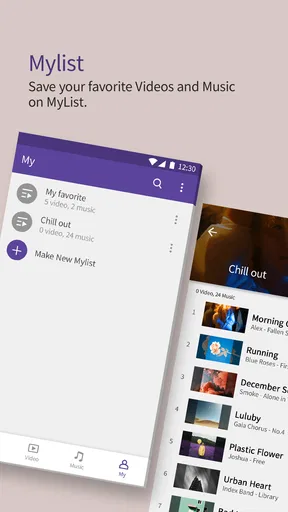
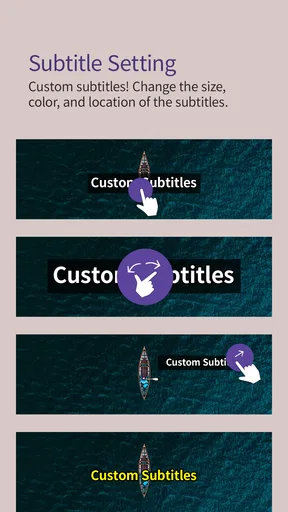
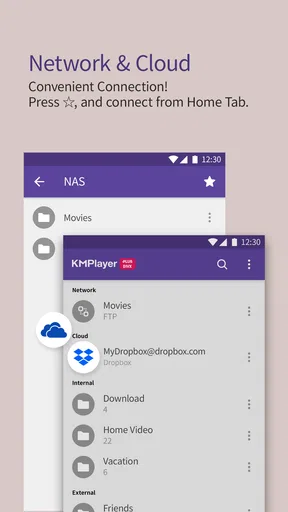
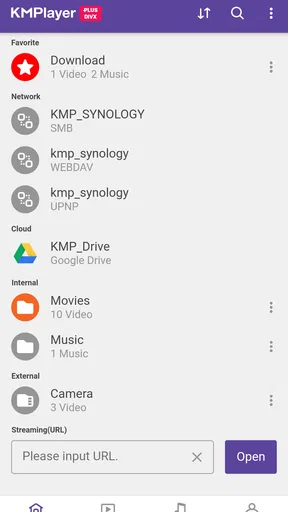
Our Review of KMPlayer Plus (Divx Codec)
 Analysis by Appyee
I judge a paid media player by whether it solves a problem I actually have, not by how long its feature list looks. KMPlayer Plus (Divx Codec) is a video player from PANDORA.TV, and its clearest reason to stand out is support for DivX playback. That makes it most interesting if you already keep videos in varied formats and want a dedicated player on your device, rather than simply needing the default app to open a recent clip.
The cost deserves a careful look before you install it. The app is listed at $3.90, with in-app purchases ranging from $1.99 to $19.99 per item. I would treat that as a paid starting point, not assume that the initial price includes every optional purchase or that any particular extra is necessary. If you only watch an occasional video, the player already on your phone may be enough; if codec support is the reason you are shopping, the price is easier to evaluate against that specific need.
Where the paid value comes from
In my view, a dedicated player earns its place when it helps you play files that otherwise take effort to manage. DivX support is the defining point here, and KMPlayer Plus is aimed at people who want that codec handled within a video-player app. The practical value is less about watching more content and more about reducing the chances that a file in a familiar format sends you searching for a converter or another player.
That distinction matters because a codec name by itself does not guarantee that every video will play perfectly on every device. Playback can still depend on the file and the device, so I would test the kinds of videos I actually own rather than buy on the assumption that one codec label promises universal compatibility. For a DivX-heavy library, the app has a clear purpose; for a collection that already plays without trouble, the benefit may be modest.
Who is likely to get their money’s worth?
I would consider it if I regularly watch downloaded or personally stored videos and have run into compatibility issues with the default player. It is also more appealing to someone who likes keeping playback in a dedicated app instead of switching between whichever app happens to open each file. Before paying, I would identify two or three representative files from my library and check that the app fits the way I normally watch them.
On the other hand, I would skip it if nearly all my viewing happens inside streaming services or if my existing player already opens everything I use. A separate purchase is hard to justify when it does not change that routine. The Everyone content rating is broad, but it does not say anything about whether the player suits a particular viewing habit; that is a personal fit question, not a content feature.
Getting Started with KMPlayer Plus
So, first things first, downloading the app was a breeze. A quick search on the app store, a tap on the download button, and voila, it was ready to go. Right off the bat, the interface struck me as clean and intuitive. No clutter, no fuss. Just a simple layout that made navigation a piece of cake.
Once I fired up the app, I was greeted with a comprehensive media library interface. It automatically scanned my device for media files, displaying them in a neat, organized fashion. Whether it was video, audio, or even subtitle files, KMPlayer Plus handled it all like a pro.
Performance and Features
Here's where things get interesting. One of the standout features of this app is its ability to support a wide range of codecs. From MP4 and MKV to AVI and FLV, it played everything without a hitch. The Divx Codec integration ensures smooth playback for high-quality videos, which is a game-changer for movie buffs like me.
Another feature that caught my eye was the gesture control. Swiping up or down adjusted the volume or brightness, and a quick swipe left or right allowed me to skip through the video effortlessly. It's the little things that make a big difference, right?
And let's talk about the subtitle feature. It supports multiple subtitle formats and even allows you to adjust the timing if things aren’t perfectly synced. No more awkwardly timed subtitles ruining the climax of your favorite movie!
Choosing it for a real viewing routine
One everyday case where I can see its appeal is a downloaded film for a commute or a trip: I could make sure the file opens before leaving, check that the subtitles are in sync, and then rely on the on-screen controls without having to dig through menus while watching. That small pre-check is useful because a player is only convenient if the particular file works on the device you plan to use. I would also keep a second copy of an important video elsewhere rather than treating any single app as a backup.
For a household that shares videos between devices, the library scan can make local files easier to find than opening folders one by one. My practical tip is to keep media organized before scanning, especially if the device contains many unrelated clips: a tidy collection makes the player’s library more useful and makes it easier to spot the video you intended to watch. If I were testing an unfamiliar file, I would try a short section first and confirm picture, audio, and subtitles before settling in for the full video.
Controls that help, and controls to learn
Gesture controls are convenient once they become familiar, but they can also take a little practice. On a small screen, a swipe intended to adjust brightness or volume may be less precise than tapping a visible control, especially if I am holding the phone one-handed. I would try the gestures with a short video first so I know which movement changes which setting before using them in the middle of a scene.
Subtitle timing adjustment is another feature with practical value beyond simply turning captions on. If dialogue and text drift apart, a small correction can make a film watchable without interrupting the viewing session to hunt for a different file. I would still check that the subtitle file matches the video; timing adjustments can fix synchronization, but they cannot make the wrong translation or an unrelated subtitle track fit.
How it compares with familiar alternatives
Compared with a phone’s built-in video app, KMPlayer Plus makes more sense when codec support, subtitle adjustment, and playback controls are priorities. The built-in option is usually the simpler choice for a quick clip that already opens correctly, because there is no reason to pay for a separate player just to repeat a task the phone handles well. For videos watched inside a streaming service, the service’s own app is the more direct option; this player is for media files rather than a replacement for a streaming catalog.
Other general-purpose players may also suit people who want broad format support, so I would compare based on the formats I actually use and the controls I prefer, not on claims of universal playback. KMPlayer Plus has a specific DivX angle and offers customization, but a simpler player can be a better fit if I rarely adjust settings. Someone who watches mostly on a television may also prefer a setup designed around that screen instead of choosing a phone player first.
The app’s current version is 36.04.235, and it requires Android 7.0 or later. It has a 4.2 average from around 1,500 ratings, alongside 56 written reviews, and has passed 10,000 installs. Those figures give a sense of its presence, but I would not treat popularity as proof that a given file will work on my device. The version and operating-system requirement are the more useful checks before deciding whether it can be installed.
Customization Galore
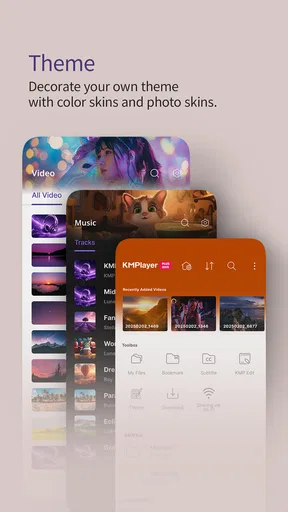
If you love tweaking settings to suit your preferences, you're in for a treat. The app offers a plethora of customization options. Whether you want to change the theme, adjust playback speed, or even apply video filters, KMPlayer Plus has got you covered. I spent a good chunk of time just exploring these options, and it was totally worth it.
There's also a nifty feature called "Network Play," which lets you stream content directly from cloud storage or a shared network drive. It opened up a whole new world of possibilities for me, especially when I wanted to watch something stored on my PC without transferring files back and forth.
Network Play in context
Network Play can be handy when the video is already stored somewhere else and I want to avoid moving a large file onto the phone. I would use it at home, where I can check that the shared location is reachable and the video starts correctly before relying on it. For travel or a spotty connection, a local copy is the safer choice; streaming from a network location depends on being able to reach that location at playback time.
That makes the feature a convenience, not a substitute for planning. If I am preparing a video for a journey, I would download or transfer it in advance and test it offline. If I am watching at home, Network Play can spare a transfer step, but I would keep file organization and connection access in mind rather than expecting the player to solve every network problem.
What to check before buying
Because the app costs $3.90 and includes optional in-app purchases priced from $1.99 to $19.99 per item, I would decide what I need before exploring paid extras. The key question is whether DivX compatibility or the player’s particular playback tools address a real problem in my routine. I would not purchase an extra simply because it appears in the app; first I would see whether the main player already covers the files and controls I care about.
KMPlayer Plus was released on July 1, 2020, and its age rating is Everyone. Neither fact tells me whether it will be the right choice for my library, but together with the Android requirement and price they help me make a practical install decision: check device compatibility, consider how often I watch local files, and decide whether the DivX focus matters to me. If my viewing is almost entirely online, I would put that money toward something I use more often.
Overall Experience
After spending some quality time with KMPlayer Plus, I can safely say that it's a solid choice for anyone looking for a robust media player. The performance is top-notch, the features are plentiful, and the customization options are just the cherry on top.
Whether you’re binge-watching the latest series, listening to your favorite tunes, or exploring indie films, this app makes the experience seamless and enjoyable. Plus, the inclusion of Divx Codec ensures that you’re getting the best video quality possible.
So, if you're in the market for a reliable media player that offers a little bit of everything, why not give KMPlayer Plus a whirl? It might just become your go-to app for all things media.
My buy-or-skip verdict
I would buy it if I had a recurring need to play DivX videos or wanted the combination of local-library browsing, subtitle timing, gestures, and network playback in one place. I would skip it if I mostly use streaming apps, already have a player that opens my files, or do not expect to use the extra controls. That is the honest value test: the app is most compelling when its particular tools remove friction I encounter often, not merely because it offers many settings.
My final recommendation is to think of it as a specialist player rather than an automatic upgrade for every phone. The developer is PANDORA.TV, and the app is in the video players and editors category, but the deciding factor is personal: do your videos need a dedicated DivX-capable player, and will you use its playback options enough to justify the price? If yes, it is a sensible option to try; if not, a built-in player or your usual streaming app is likely the more practical choice.
Verdict
Strengths of KMPlayer Plus (Divx Codec)
- Supports a wide range of video formats.
- Offers high-quality playback options.
- User-friendly interface and navigation.
- Customizable settings for personalization.
- Integrates with cloud storage seamlessly.
Limitations of KMPlayer Plus (Divx Codec)
- Contains in-app ads despite being paid.
- Advanced settings can be overwhelming.
- Requires strong hardware for 4K streaming.
- Limited subtitle format support.
- Occasional crashes on older devices.
Other Releases by PANDORA.TV
View All
KMPlayer - All Video Player
Video Players & Editors4.1
Similar Picks in This Category
View All
Google TV
Google LLC3.9

iTunes
Apple4.7

YouTube
Google LLC3.8

MX Player
Amazon Mobile LLC4.2

CapCut - Video Editor
Bytedance Pte. Ltd.3.5

PLAYit-All in One Video Player
PLAYIT TECHNOLOGY PTE. LTD.4.5
Frequently Asked Questions
What is KMPlayer Plus (Divx Codec) and how does it differ from the free version?
KMPlayer Plus (Divx Codec) is a premium version of the popular media player, KMPlayer. It offers advanced features like high-quality video playback, including support for Divx codecs, and an ad-free experience. This version also includes enhanced customization options and priority support, making it ideal for users who want an uninterrupted and superior viewing experience.
Which video and audio formats are supported by KMPlayer Plus?
KMPlayer Plus supports a wide range of video and audio formats, including popular ones like AVI, MP4, MKV, and MP3. It also handles less common formats such as OGG, FLAC, and 3GP. The inclusion of Divx codecs further extends its capability to play high-quality video formats, ensuring versatile media playback.
Does KMPlayer Plus offer any special features for subtitles and multi-language support?
Yes, KMPlayer Plus provides extensive subtitle support, allowing users to load and customize subtitles easily. It supports multiple subtitle formats and offers synchronization options. Additionally, the app supports multi-language interfaces, making it accessible to a global audience and enhancing the viewing experience through seamless subtitle integration.
Is KMPlayer Plus user-friendly for beginners, and what customization options are available?
KMPlayer Plus is designed with an intuitive interface that is user-friendly, even for beginners. It offers simple navigation and easy access to essential playback controls. For advanced users, it provides a range of customization options, such as adjusting playback speed, screen size, and visual themes, enabling users to tailor the app to their preferences.
Can KMPlayer Plus be used across different devices and platforms?
KMPlayer Plus is available on both Android and iOS platforms, making it compatible with a wide range of devices. This cross-platform availability ensures that users can enjoy their media content seamlessly on smartphones and tablets. It also supports cloud storage access, allowing users to stream content from online sources efficiently.
